REVIEW · LOS ANGELES
An Epic Scavenger Hunt: Tinseltown’s Biggest Stars
Book on Viator →Operated by Let's Roam · Bookable on Viator
That game is actually the city. Hollywood turns into a scavenger hunt with quick photo challenges and smart wayfinding.
What makes this one fun is the mix of big recognizably Hollywood stops and a role-based game you play on your phone. You’ll move past iconic theaters and landmarks, hunt for stars, and look up at mosaics while you work through the clues at your own pace.
I like the photo challenges with built-in roles (you pick Braniac, Photographer, or Mapper), because it stops the whole thing from feeling like a slow walking tour. I also like that the route is stroller and wheelchair accessible and easy to find from the start point on Hollywood Blvd.
One drawback to keep in mind: it’s a self-guided mobile app game, and if the app won’t load for any reason, you may be stuck mid-challenge. The good news is support is available—but it’s still something to handle carefully before you start.
In This Review
- Key things to know before you go
- How this Hollywood scavenger hunt turns landmarks into a game
- Price and value: what $12.31 actually covers
- Getting started on Hollywood Blvd: the easiest first step
- The Let’s Roam app: maps, riddles, and photo challenges
- Stop-by-stop: your Hollywood loop of theaters and landmarks
- Stop 1: Pantages Theatre
- Stop 2: Capitol Records Building
- Stop 3: Egyptian Theatre
- Stop 4: TCL Chinese Theatres
- Stop 5: The Hollywood Museum
- Stop 6: Hollywood Palladium
- Stop 7: Blessed Sacrament Catholic Church
- Timing, walking pace, and accessibility that actually matters
- The main risk: app problems and what to do about them
- Who this hunt is best for (and who might prefer something else)
- Should you book this Hollywood hunt?
- FAQ
- How long does the Hollywood scavenger hunt take?
- Is this a guided tour with a live guide?
- Can I start at any time?
- What’s included in the price?
- Is the route stroller and wheelchair accessible?
- What if the app doesn’t work on my phone?
Key things to know before you go

- Max 10 per group keeps the hunt from getting too crowded
- Plan about 2 hours for the whole route, from start back to start
- Stroller and wheelchair accessible route with a practical Hollywood walking loop
- Mobile ticket + Let’s Roam app runs the maps, riddles, and photo tasks
- Role system (Braniac, Photographer, Mapper) keeps teams from doing the exact same job
- Digital photo copies mean you leave with more than just memories
How this Hollywood scavenger hunt turns landmarks into a game
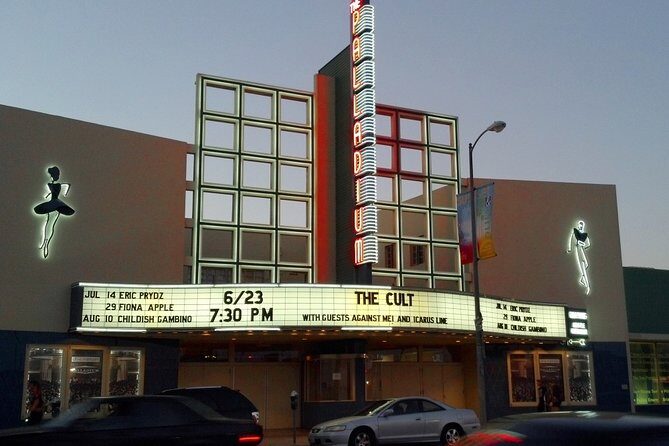
This isn’t a sit-and-listen tour. It’s a walking challenge that uses the city as your game board. You’re not just seeing Hollywood—you’re collecting answers, snapping photos for prompts, and moving through a set loop of recognizable stops.
That matters because it changes your pacing. Instead of thinking, “How long is this going to take?” you’ll think, “What’s the next clue?” That’s a small mental shift, but it makes the walk feel shorter and more playful—especially for groups where people have different walking speeds.
You also get a built-in structure. The app handles the riddles and leaderboards, while your group’s assigned role shapes what you focus on. Even if you’re not a super competitive person, the roles make it feel like everyone has a job.
You can also read our reviews of more tours and experiences in Los Angeles.



Price and value: what $12.31 actually covers

At $12.31 per person, the big value isn’t a guide’s commentary. It’s the package: you’re buying the self-guided hunt system, the app access, and the photo workflow that produces digital copies of your adventure photos.
Here’s what you’re paying for in practical terms:
- A self-guided adventure hunt you can run at your own pace
- An individual role for each player (Braniac, Photographer, Mapper)
- App access for maps, photo challenges, riddles, and leaderboards
- Phone/email/chat support if you get stuck
- Everything bundled with taxes/fees/handling charges
What’s not included is also worth noting: attraction fees and food/drinks are not part of the price, and there’s no tour guide. So this is best viewed as an organized game kit in the city—not a guided sightseeing service.
If you want a guided history lesson at each stop, this won’t replace that. But if you want a fun way to cover key Hollywood sights without booking a pricey guided outing, the price can be easy to justify.
Getting started on Hollywood Blvd: the easiest first step

You start at 1750 Vine St, Los Angeles, CA 90028, and the hunt ends back at the meeting point. The route is described as easy to find from Hollywood Blvd, which is exactly what you want in a city where wrong turns can cost time and energy.
Two practical tips here:
- Arrive with enough time to settle your group and open the app before you begin.
- Use the meeting point as your “reset point.” Since the activity loops back, you won’t be improvising a new end plan.
Also, there’s a max of 10 per group, which is helpful. A smaller group size makes the game feel smoother, especially when you’re stopping for photos and answering prompts.
The Let’s Roam app: maps, riddles, and photo challenges

This hunt runs through the Let’s Roam app on your phone, with a mobile ticket. That means your experience depends on two things: signal and battery.
The checklist from the organizer is simple, and I’d treat it like a rule:
- Make sure your smartphone is fully charged before the tour
- Bring a power bank if you think your battery might run low
Why this matters: the app handles the maps, riddles, and leaderboards, and you’ll be doing photo challenges for each player. If your phone dies, the game stops. If the app acts up, you lose that momentum.
One more practical point: because you choose a role (Braniac, Photographer, Mapper), you should decide that early. If you wait until you’re standing at Stop 1, you’ll burn time and your group will feel rushed.
Stop-by-stop: your Hollywood loop of theaters and landmarks

This route is built around a string of recognizable Hollywood stops, with photo moments and clue-solving at each one. You’ll get through the loop in about 2 hours, and the stops include both major venues and a few quieter-but-interesting landmarks.






Stop 1: Pantages Theatre
You begin with Pantages Theatre, a solid “first big landmark” because it sets the tone immediately. Expect your first photo challenge to get your group into rhythm—figuring out how your role works and how the app guides you from moment to moment.
Possible consideration: since this is an early stop, it’s where you’re most likely to still be adjusting your phone settings. Make sure your app is ready before you arrive.
Stop 2: Capitol Records Building
Next is the Capitol Records Building. This kind of stop works well in a scavenger hunt because it’s visually distinct, and your role-based tasks can turn a quick look into something you actively complete.
Practical tip: if you’re taking photos, keep your group spaced out so everyone can follow the clues without crowding one another.
Stop 3: Egyptian Theatre
Then you hit the Egyptian Theatre. The tour description specifically calls out looking up at mosaics overhead, and this stop is the kind of place where that visual scavenger feeling clicks—you’re not just reading the clue, you’re hunting for the right details in view.
Drawback to watch for: if you’re traveling with someone who doesn’t like walking and stopping, you’ll want to keep them engaged by assigning the “looking” job to the Photographer role right away.
Stop 4: TCL Chinese Theatres
At TCL Chinese Theatres, the “stars beneath your feet” vibe from the hunt description becomes part of the experience. These are the stops where the game format shines because you’re turning sightseeing into specific tasks—spot, match, photograph, answer.
If you’re in a stroller: the route is said to be accessible, but crowded sidewalks can still happen around major venues. Go at a steady pace and don’t get stuck behind slow-moving clusters.
Stop 5: The Hollywood Museum
Next is The Hollywood Museum. This is a different flavor than the pure theaterfront stops. For a scavenger hunt, museum-adjacent areas often feel like a pause—an opportunity to reset your group, review your progress, and get ready for the last stretch.
What to look for: use the app prompts to guide your timing. The hunt is designed so you aren’t wandering aimlessly trying to “find the museum spot.”
Stop 6: Hollywood Palladium
Then comes Hollywood Palladium, another major entertainment location. This is where you’ll likely notice how the roles keep teams moving efficiently. Mapper types usually do best here, because they’re the ones mentally tracking where you are next.
Possible consideration: if your group tends to split attention, remind everyone to regroup at each stop’s photo/task moment.
Stop 7: Blessed Sacrament Catholic Church
Finally, the route includes Blessed Sacrament Catholic Church. Ending with a place like this helps break up the venue-heavy loop and gives the hunt a sense of variety.
Even though it’s a game, I’d still encourage a respectful pace here. The app may be asking for specific photo challenges, but you’ll want to keep it low-key while you finish your final set of tasks.
Timing, walking pace, and accessibility that actually matters

The hunt runs about 2 hours (approx.), and it’s described as stroller and wheelchair accessible. It also lists a moderate physical fitness level, so think “comfortable walking” rather than “easy stroll.”
For most people, the practical pacing comes down to:
- How often your group stops for photos
- Whether you’re solving clues quickly or taking your time
- How smoothly the app loads and updates
If you’re traveling with kids, strollers, or anyone with mobility needs, start early in the day when sidewalks are less likely to feel chaotic. The route is accessible, but Hollywood foot traffic can still vary by time.
One more easy win: because you can start at any time and at your own pace (this is a private self-guided activity), you can adjust your pace to match your group rather than fighting a fixed tour schedule.
The main risk: app problems and what to do about them

Here’s the honest part. One of the key issues that came up is not the route—it’s the technology. There was a report of not being able to log into the app to get the game going, and the traveler couldn’t obtain a refund because the booking is non-refundable.
That doesn’t mean the hunt is doomed. It does mean you should treat your phone like part of your luggage:
- Test that the app can load before you start
- If possible, download/setup right after you book
- Keep your phone charged and ready to use in sunlight
And if something goes wrong, there is support. The support response you can count on includes phone and chat help, with hours listed in Mountain Time:
- Mon–Thu 6:00AM–10:00PM
- Fri–Sat 5:00AM–11:00PM
- Sun 6:00AM–10:00PM
A practical move: if you arrive and the app isn’t cooperating, don’t wait around guessing. Contact support promptly so you have the best chance of getting your hunt set up quickly.
Who this hunt is best for (and who might prefer something else)

I think this works especially well if you:
- Want a low-cost Hollywood activity that still feels structured
- Like interactive tasks more than lectures
- Travel with friends or family who enjoy teamwork
- Want something that can be done at your own pace
It’s also a good choice for mixed-experience groups, since roles like Braniac, Photographer, and Mapper distribute the work. Different personalities can contribute without everyone doing the same thing.
You might skip it if:
- Your group hates phone-based activities or gets easily frustrated by apps
- You strongly want a guide to interpret sights and history
- You’re hoping to guarantee a refund if technology fails (this one is non-refundable)
Should you book this Hollywood hunt?
Book it if you want a playful way to cover major Hollywood landmarks without paying for a guided tour—and if you’re willing to manage your phone setup.
Think twice if you know your group struggles with mobile tech on the best day, because this is a phone-led game. The route is accessible and the starting point is easy, but your success hinges on the app working and your battery staying alive.
If you do book: charge early, arrive ready, and set expectations that it’s a game. Do that, and you’ll spend your time hunting for clues instead of hunting for reasons your phone won’t cooperate.
FAQ
How long does the Hollywood scavenger hunt take?
It’s designed to take around 2 hours for the full scavenger hunt route.
Is this a guided tour with a live guide?
No. This is a self-guided adventure hunt, with photo challenges and navigation handled through the mobile app.
Can I start at any time?
Yes. It’s a private self-guided activity, so you can start at any time and at your own pace.
What’s included in the price?
Included are the self-guided Los Angeles adventure hunt, individual roles, photo challenges through the app, access to the Let’s Roam app for maps and riddles, digital copies of your photos, and phone/email/chat support, plus taxes/fees/handling charges.
Is the route stroller and wheelchair accessible?
Yes, the route is listed as stroller and wheelchair accessible.
What if the app doesn’t work on my phone?
The activity uses the Let’s Roam app and requires your device to be fully charged, with a power bank recommended if needed. Support is available by phone or chat during listed hours, and the organizer notes they can help with setup and assistance.
If you want, tell me what day/time you’re going and your group makeup (age range, mobility needs, how tech-comfortable people are). I’ll suggest the best time to start and a simple “avoid app trouble” plan for your group.